

Fluid Design Widgets for KWGT
Version:v6e3k36t261015
Published:2026-11-05
Introduction
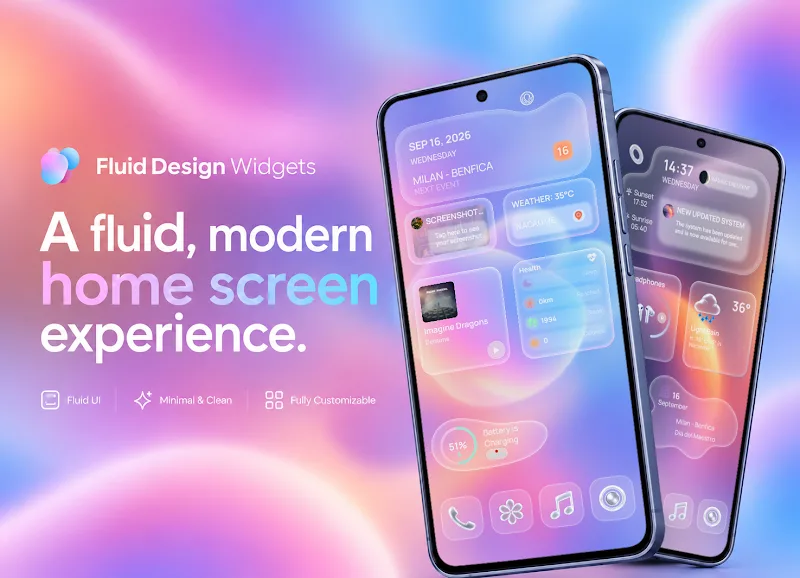
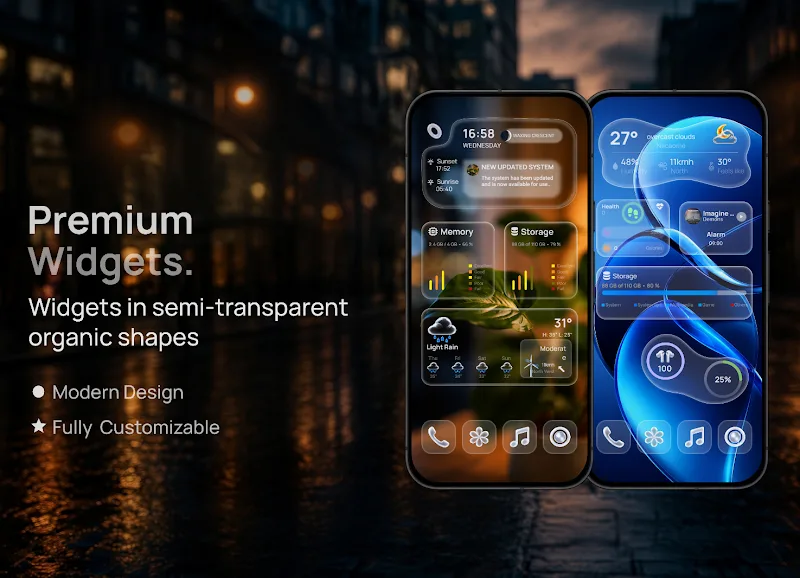
Fluid Design Widgets for KWGT brings a modern collection of customizable home screen widgets for KWGT users, blending minimalist visuals with practical data displays. It supplies scalable clock, weather, media and info widgets designed for easy editing, letting users craft a consistent, polished Android interface with minimal setup and clear controls.
What the pack includes
The widget set focuses on clean, fluid layouts that adapt to different screen sizes and themes. Fluid Design Widgets for KWGT bundles a variety of elements: clocks, battery meters, step counters, weather modules, music controls and compact information tiles. Each component is built to be modular so you can mix and match elements without breaking the overall look.
Key features at a glance
- Responsive templates that scale smoothly across phones and tablets.
- Editable layers for fonts, colors and opacity — no advanced scripting required.
- System-friendly resources that use low memory and avoid unnecessary battery drain.
- Multiple widget sizes for home screens and lock screens.
- Design-focused presets for quick setup with consistent typography and spacing.
How it integrates with KWGT
Fluid Design Widgets for KWGT is a companion pack, so it relies on the KWGT app to render and configure widgets. Open KWGT, choose a widget size, then load a template from the pack. From there you can tweak elements inside the KWGT editor: reposition items, change sources, set touch actions and preview the result in real time.
Customization workflow
The customization flow emphasizes speed and clarity. Templates are organized by purpose (clocks, information tiles, media), and each layer is labeled to guide edits. If you want a different font or color palette, replace the layer values and save a new preset. The pack also provides examples of adaptive layouts that change appearance when placed on wallpapers with different contrast levels.
Performance and visual polish
Designers prioritized lightweight assets to keep load times short. Vector shapes and optimized PNGs are used where appropriate, reducing CPU usage while maintaining crisp visuals. Animations are subtle and optional, so users with older hardware can disable transitions without losing the layout integrity.
User experience notes
Fluid Design Widgets for KWGT is made for people who prefer a minimal, coherent home screen. The controls in KWGT remain the primary place to make deep adjustments, but the pack reduces the fiddly setup by providing thoughtfully tuned starting points. Visual consistency across widgets helps maintain a unified appearance across different launcher configurations.
Getting started quickly
- Install KWGT and grant the app the necessary permissions.
- Download Fluid Design Widgets for KWGT and open a KWGT widget placeholder on your home screen.
- Select a template from the pack, then tap to edit and adapt fonts, colors and touch actions.
- Save your custom layout and export backups if you plan to switch devices.
Tips for new users
Begin with the preset templates rather than building from scratch. Swap fonts and colors first to match your wallpaper, then enable or disable layers to simplify the composition. If you want consistent spacing across widgets, use the same grid and margin values in KWGT so elements align perfectly.
Why adopters recommend it
Users appreciate Fluid Design Widgets for KWGT because the pack speeds up the styling process while preserving control. It’s particularly useful for people who want a polished look without spending hours on adjustments. The curated presets help maintain a modern aesthetic that works well with popular launchers and icon packs.
Whether you’re enhancing function or sharpening the look of your home screen, Fluid Design Widgets for KWGT is a focused toolkit that balances design quality with efficient customization. The pack is a practical choice for anyone who uses KWGT to tailor their Android experience and wants dependable, editable templates as a foundation.
Show More
Information
Screenshots
Latest Update





Latest News
-
![Revealing the Launch Playlists and Cross-Progression for COD Warzone Mobile News]()
-
![March 2024 Free Redemption Codes for Honkai: Star Rail News]()
-
PUBG Mobile Teams Up with Bentley Motors: Luxury Cars, Exclusive Collectibles, and Beyond 2024-04-18
![PUBG Mobile Teams Up with Bentley Motors: Luxury Cars, Exclusive Collectibles, and Beyond News]()
-
![Monster Never Cry is now accessible on both Android and iOS mobile devices. News]()
-
V2.2 of the Farlight 84 update introduces an overhauled Season structure, fresh in-game currency, an 2024-04-16
![V2.2 of the Farlight 84 update introduces an overhauled Season structure, fresh in-game currency, an News]()
-
![Arrival of Genshin Impact 4.6 Update: 'Embers of Two Realms, Twilight of Crimson' News]()
-
April 2024 Clash of Clans Update: Unveiling a Fresh Companion, Enhanced Levels, Chat Tagging, and Be 2024-04-16
![April 2024 Clash of Clans Update: Unveiling a Fresh Companion, Enhanced Levels, Chat Tagging, and Be News]()






