

The Athletic
Version:13.39.0
Published:2026-11-07
Introduction
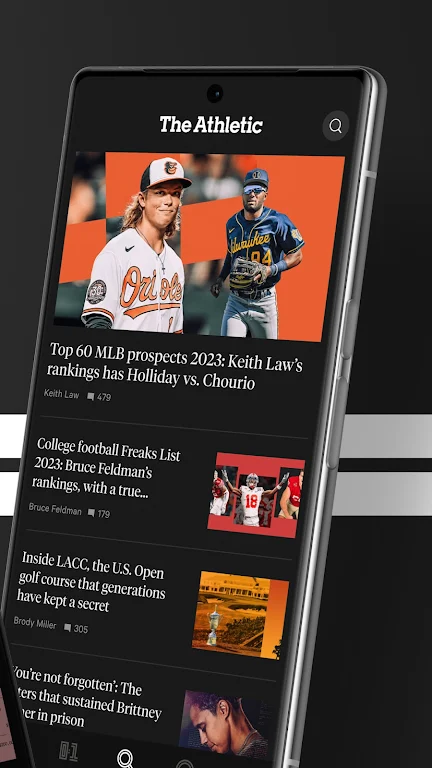
Most sports apps bury you in noise and recycled headlines, making it hard to find thoughtful coverage when you need it. The Athletic aims to change that by offering a focused sports news experience for Android where long-form reporting, expert columns and audio content live alongside timely updates. This review looks at how The Athletic organizes leagues, the main tools it offers for personalization and listening, and practical ways to use the app whether you want deep reads before a game or quick context during a coffee break.
Categories:
Major leagues: The Athletic centers heavily on established professional competitions, making it a go-to source for in-depth NBA, MLB and NFL coverage alongside other top-tier events.
Team and regional beats: Coverage often drills down to individual clubs and local storylines, so you can follow the reporters who cover the teams you care about most.
Feature journalism: Beyond scores and lineups, expect long-form features and opinion pieces that explore tactics, front-office moves and player narratives.
Features:
Focused editorial pieces: The Athletic highlights analyses written by staff and contributors who explain what happened and why it matters, not just the play-by-play.
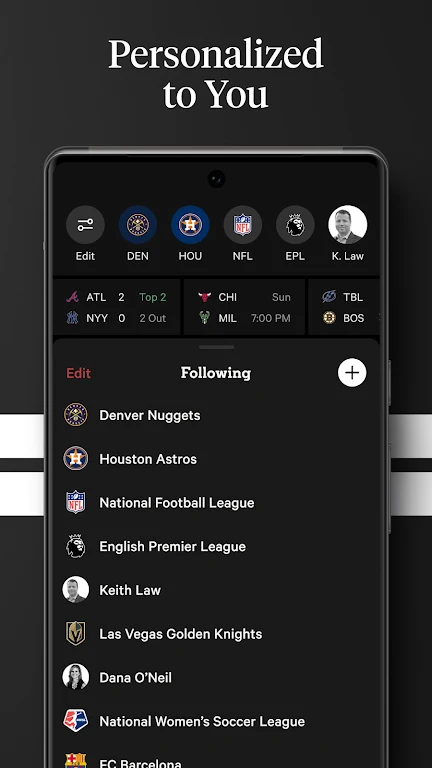
Customizable feed: You can prioritize leagues, teams and writers so the main feed shows the stories that match your interests without scrolling through unrelated items.
Bookmarks and alerts: Save articles and subscribe to alerts for specific topics so you get notified when a team update or new column is posted.
Audio content: The app bundles podcasts and audio shows, enabling hands-free listening while you work out or cook dinner.
Tips and Tricks:
Refine notifications: Turn on alerts only for game starts, injury reports or columnist updates to avoid being overwhelmed by every headline.
Create a watchlist: Follow a small set of teams and writers to train your feed and surface deeper stories about those subjects faster.
Use audio during chores: If you want to catch a long interview or postgame discussion, queue podcasts for laundry time or while making dinner to make listening feel effortless.
Save for offline reading: When you know you will be offline on a flight or in a meeting, bookmark a couple of feature articles in advance so you have quality reads available.
FAQs:
Do I need an account to use The Athletic?
You can browse some content without signing in, but creating an account unlocks personalization tools like follows, bookmarks and alert management.
Can I follow one team or one writer?
Yes. The app is designed to let you follow specific teams or contributors so your main feed surfaces relevant stories first.
Are podcasts available inside the app or through external players?
Podcasts are accessible within the app and you can play them there; options for external playback or downloads vary by episode, so check the playback controls for each show.
Conclusion:
The Athletic positions itself as a reader-first sports app where curated reporting and audio meet practical personalization tools. If you value in-depth analysis and want a cleaner, more team-focused feed, give The Athletic a try on Android and explore the bookmarking and alert settings to shape the coverage to your schedule.
Show More
Information
Screenshots

Latest Update












Hot Tags
Latest News
-
![Revealing the Launch Playlists and Cross-Progression for COD Warzone Mobile News]()
-
![March 2024 Free Redemption Codes for Honkai: Star Rail News]()
-
PUBG Mobile Teams Up with Bentley Motors: Luxury Cars, Exclusive Collectibles, and Beyond 2024-04-18
![PUBG Mobile Teams Up with Bentley Motors: Luxury Cars, Exclusive Collectibles, and Beyond News]()
-
![Monster Never Cry is now accessible on both Android and iOS mobile devices. News]()
-
V2.2 of the Farlight 84 update introduces an overhauled Season structure, fresh in-game currency, an 2024-04-16
![V2.2 of the Farlight 84 update introduces an overhauled Season structure, fresh in-game currency, an News]()
-
![Arrival of Genshin Impact 4.6 Update: 'Embers of Two Realms, Twilight of Crimson' News]()
-
April 2024 Clash of Clans Update: Unveiling a Fresh Companion, Enhanced Levels, Chat Tagging, and Be 2024-04-16
![April 2024 Clash of Clans Update: Unveiling a Fresh Companion, Enhanced Levels, Chat Tagging, and Be News]()






