

Map My Fitness
Version:25.2.0
Published:2026-11-07
Introduction
Track, plan, improve: Map My Fitness brings a full-featured training log and synchronized workout environment to your Android device. The app is built for people who want a clear routine, measurable progress and simple device syncing without fuss. Map My Fitness helps you assemble workouts from a large exercise library, monitor sets and reps, and view progress charts so your effort stays visible. Whether you're rebuilding strength after a break or building a weekly habit, the app organizes sessions and keeps basic stats like calories and duration in one place.
Getting Started with Map My Fitness
Create an account: Sign up with an email or use single-step sign-in to store plans and sync across devices.
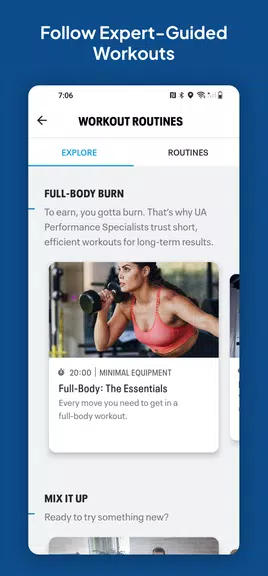
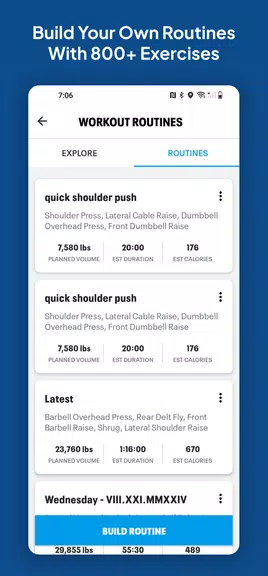
Choose or build a routine: Pick a pre-made plan or assemble your own by selecting exercises from the searchable library and sequencing them into days.
Connect devices: Link external trackers and health services for consolidated data, so your runs or wearable metrics appear alongside strength sessions.
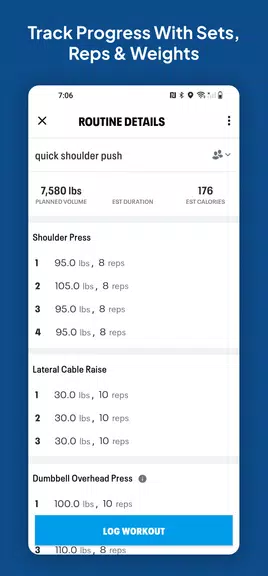
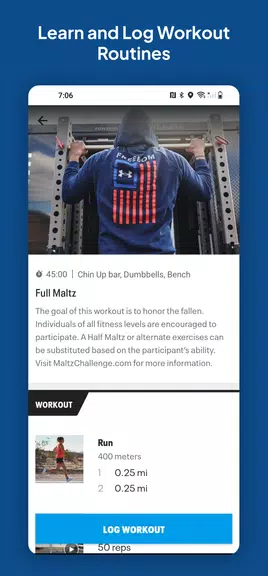
Track a session: Start a workout timer, log sets, weights and repetitions, and let the app record totals and estimated calories.
Features of Map My Fitness
Large exercise catalog: The app includes hundreds of exercises with short descriptions so you can vary workouts and target different muscle groups.
Custom routines: Save personal routines and reorder exercises as your needs change; templates are useful if you prefer a guided approach.
Live feedback and stats: During workouts you'll see realtime numbers for time, reps and burned calories, and after sessions you get summaries to compare performance over weeks.
Cross-platform sync: Map My Fitness supports connection with popular health platforms and many wearables so data flows in without manual transfers.
Tips and Tricks
Start small: Use short sessions in the beginning and increase sets as consistency becomes second nature.
Use templates as guides: Modify recommended routines rather than following them strictly; small personal tweaks keep plans realistic.
Review weekly trends: Look at the activity summary rather than single workouts to spot steady gains or recurring gaps.
FAQs about Map My Fitness
Do I need a wearable to use Map My Fitness?
No. You can log workouts manually and use the app as a standalone tracker; connecting a device simply adds extra data like heart rate and GPS.
Can I export my workout history?
Yes, the app offers options to export summaries or sync with other services so you can keep records outside the app.
Is the exercise library suitable for beginners?
The catalog contains basic to advanced movements and short notes for each exercise, so beginners can pick simple options while experienced users create complex routines.
Conclusion:
Map My Fitness provides a clear way to plan, record and review your workouts while keeping device data in one place. It works well for people who want structure and measurable progress, though advanced athletes may miss very specialized coaching features found in dedicated pro platforms. Feature sets and integrations can change between updates, so check the latest release notes for new sync partners or expanded exercise content.
Show More
Information
Screenshots
Latest Update










Hot Tags
Latest News
-
![Revealing the Launch Playlists and Cross-Progression for COD Warzone Mobile News]()
-
![March 2024 Free Redemption Codes for Honkai: Star Rail News]()
-
PUBG Mobile Teams Up with Bentley Motors: Luxury Cars, Exclusive Collectibles, and Beyond 2024-04-18
![PUBG Mobile Teams Up with Bentley Motors: Luxury Cars, Exclusive Collectibles, and Beyond News]()
-
![Monster Never Cry is now accessible on both Android and iOS mobile devices. News]()
-
V2.2 of the Farlight 84 update introduces an overhauled Season structure, fresh in-game currency, an 2024-04-16
![V2.2 of the Farlight 84 update introduces an overhauled Season structure, fresh in-game currency, an News]()
-
![Arrival of Genshin Impact 4.6 Update: 'Embers of Two Realms, Twilight of Crimson' News]()
-
April 2024 Clash of Clans Update: Unveiling a Fresh Companion, Enhanced Levels, Chat Tagging, and Be 2024-04-16
![April 2024 Clash of Clans Update: Unveiling a Fresh Companion, Enhanced Levels, Chat Tagging, and Be News]()






