

Colorful OS Launcher
Version:6.9
Published:2026-11-06
Introduction
?Looking for a quick way to give your Android a fresh look that borrows the polish of modern phone UIs?
Colorful OS Launcher lets you restyle your home screen with an iOS-inspired aesthetic while keeping Android under the hood. The launcher focuses on visual fidelity and small convenience upgrades: tidy folder designs, adjustable app grids, notification badges, and a compact search bar. It aims to reproduce familiar iPhone-style touches without slowing your device, and it bundles a few smart helpers like a rarely-used app collection to keep your main screens uncluttered.
Highlights of Colorful OS Launcher:
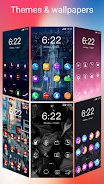
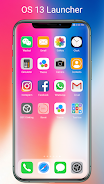
Sleek iOS-like visuals: The interface recreates rounded icons, soft folder backgrounds, and a clean dock to give your phone a modern, minimalist feel.
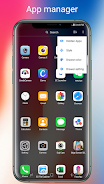
Custom grid options: Choose how many icons sit on each row and column to fit more apps or keep spacing airy for a cleaner look.
Notification badges: Unread badges appear as small red dots on icons so you can spot pending alerts at a glance.
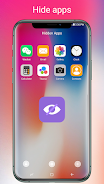
Rarely-used smart folder: Apps you haven’t opened in a while are grouped out of the way, making your primary pages easier to scan.
Features of Colorful OS Launcher:
Folder styling: Folders mimic the layered, colorful appearance associated with recent iPhone releases, with smooth opening animations that feel polished.
Weather and quick utilities: A native widget area supports weather readouts and can host small shortcuts without cluttering app rows.
Search bar integration: A simple search bar sits where you expect it, letting you find apps and contacts without switching screens.
Layout lock: Lock your home screen arrangement with a PIN or fingerprint so accidental changes are prevented when you hand the device to someone else.
Smooth performance: The launcher is built to be lightweight so daily actions like swiping between pages and opening folders remain responsive.
Getting Started with Colorful OS Launcher:
Install and set as default: After installing the APK, open the app and choose it as your default launcher so the new styles take effect on the home button.
Pick a grid and icon size: Tweak rows and columns from the settings menu to fit more icons or create larger tap targets for easier use.
Secure the layout: Use the layout lock option to require a PIN or fingerprint before home screen editing is allowed; this is useful if kids or friends borrow your phone.
Restore or customize icons: Apply an icon pack or change individual icons from the home screen to match your wallpaper and theme.
Practical scenarios: While commuting, you can quickly hide lesser-used apps to keep the main screen readable at a glance; before handing the device to a child, activate layout lock so favorites stay in place.
FAQs of Colorful OS Launcher:
Is Colorful OS Launcher free to use?
There is typically a free version with core features; some themes or advanced settings may be gated behind in-app purchases or a premium option depending on the release.
Will this launcher slow down my phone?
Most users report smooth performance on mid-range and newer devices because the launcher emphasizes lightweight animations, though very old hardware may see a mild difference.
Can I return to my previous launcher?
Yes. You can switch back at any time in Android settings by selecting a different default home app. Your old layout remains available if the previous launcher is still installed.
Conclusion:
Compared with stock Android homescreens, Colorful OS Launcher delivers a clean, iPhone-inspired presentation and helpful layout tools that suit users who value visual polish and simple organization; it works best for people who want a fresh look without deep tinkering, though power users expecting heavy customization may miss certain advanced options.
Show More
Information
Screenshots
Latest Update




Hot Tags
Latest News
-
![Revealing the Launch Playlists and Cross-Progression for COD Warzone Mobile News]()
-
![March 2024 Free Redemption Codes for Honkai: Star Rail News]()
-
PUBG Mobile Teams Up with Bentley Motors: Luxury Cars, Exclusive Collectibles, and Beyond 2024-04-18
![PUBG Mobile Teams Up with Bentley Motors: Luxury Cars, Exclusive Collectibles, and Beyond News]()
-
![Monster Never Cry is now accessible on both Android and iOS mobile devices. News]()
-
V2.2 of the Farlight 84 update introduces an overhauled Season structure, fresh in-game currency, an 2024-04-16
![V2.2 of the Farlight 84 update introduces an overhauled Season structure, fresh in-game currency, an News]()
-
![Arrival of Genshin Impact 4.6 Update: 'Embers of Two Realms, Twilight of Crimson' News]()
-
April 2024 Clash of Clans Update: Unveiling a Fresh Companion, Enhanced Levels, Chat Tagging, and Be 2024-04-16
![April 2024 Clash of Clans Update: Unveiling a Fresh Companion, Enhanced Levels, Chat Tagging, and Be News]()






