
Floating Notes
Version:3.44
Published:2026-11-11
Introduction
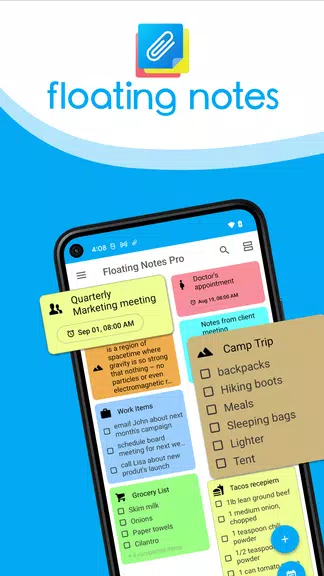
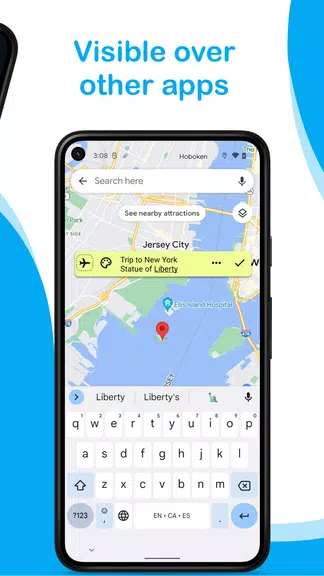
On-screen note utilities have a practical new option for Android in Floating Notes. This lightweight tool keeps short reminders and longer memos always accessible by placing them over other apps, so you can glance at a shopping list while browsing a recipe or keep a project checklist visible during a video call. Floating Notes offers a mix of quick-entry snippets and expandable notes, plus visual controls like icons, colors and transparency so your overlays stay helpful without getting in the way.
Wonderful Features of Floating Notes
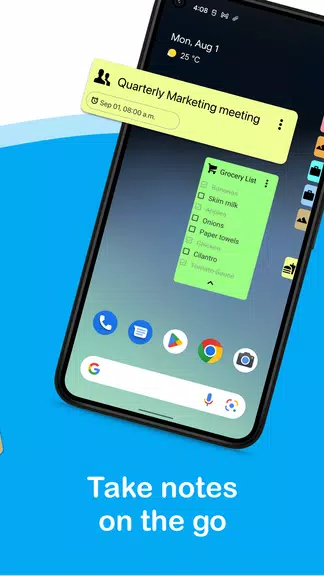
Always-on overlay: Notes float above other applications so important information stays visible while you work, watch, or browse.
Edge minimization: Shrink notes to tidy icons along the screen edge to keep your view uncluttered and bring them back with a tap.
Scheduled appearance: Set notes to pop up at specific times so reminders arrive exactly when you need them.
Visual customization: Pick from a variety of icons, colors and transparency levels to make each note instantly recognizable and unobtrusive.
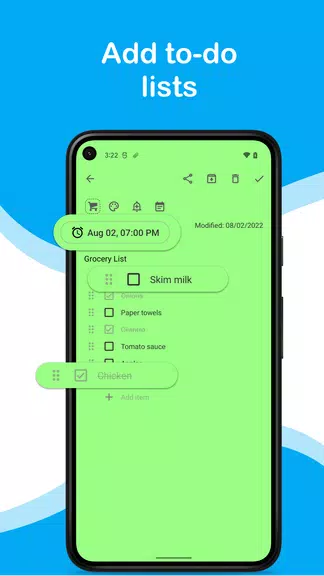
Checklists and full-screen editing: Create task lists you can tick off while using other apps and expand long entries into full-screen mode for easier typing.
Cross-device sync: Synchronize your notes across multiple Android devices so edits on one handset update everywhere.
Types of Floating Notes
Quick snippets: Short reminders or phone numbers that you can add in a moment and keep visible without opening a full editor.
Checklists: Itemized to-dos for tracking steps during multitasking sessions, useful for errands or work tasks.
Timed notes: Reminders that appear automatically at scheduled times, useful for medication prompts or meeting starts.
Expanded memos: Longer notes that open in full-screen when you need to write or read more detailed content.
Useful Tips of Floating Notes
Use transparency wisely: Lower opacity when watching videos or reading so a note remains readable without blocking content.
Assign icons by purpose: Give colors and symbols to different categories—shopping, work, ideas—so you can locate the right note fast.
Schedule for routines: Automate recurring reminders for daily habits like exercise, study time or household chores.
Keep a single master note: Use one always-visible checklist for a project and tuck supporting details into full-screen notes to avoid distraction.
FAQs of Floating Notes
Can I hide notes while watching a movie?
Yes. Visibility can be turned off quickly so overlays don’t interfere with full-screen video or games.
Does the app sync across devices?
Floating Notes supports synchronization so you can access the same notes on multiple Android devices after signing into the same account.
Are there privacy controls for sensitive notes?
The app keeps local editing simple; for sensitive content use your device lock and the app's visibility toggle before sharing your screen or handing your phone to others.
Final Verdict
Floating Notes is a handy tool if you want quick, always-available reminders and checklists without switching apps; it shines for multitasking and routine management, though power users may want deeper organization features from a full note-taking suite.
Show More
Information
Screenshots
Latest Update










Hot Tags
Latest News
-
![Revealing the Launch Playlists and Cross-Progression for COD Warzone Mobile News]()
-
![March 2024 Free Redemption Codes for Honkai: Star Rail News]()
-
PUBG Mobile Teams Up with Bentley Motors: Luxury Cars, Exclusive Collectibles, and Beyond 2024-04-18
![PUBG Mobile Teams Up with Bentley Motors: Luxury Cars, Exclusive Collectibles, and Beyond News]()
-
![Monster Never Cry is now accessible on both Android and iOS mobile devices. News]()
-
V2.2 of the Farlight 84 update introduces an overhauled Season structure, fresh in-game currency, an 2024-04-16
![V2.2 of the Farlight 84 update introduces an overhauled Season structure, fresh in-game currency, an News]()
-
![Arrival of Genshin Impact 4.6 Update: 'Embers of Two Realms, Twilight of Crimson' News]()
-
April 2024 Clash of Clans Update: Unveiling a Fresh Companion, Enhanced Levels, Chat Tagging, and Be 2024-04-16
![April 2024 Clash of Clans Update: Unveiling a Fresh Companion, Enhanced Levels, Chat Tagging, and Be News]()






