

Soni Typing Tutor
Version:1.1.2
Published:2026-11-21
Introduction
Soni Typing Tutor helps users improve typing speed and accuracy through structured lessons, timed tests, and adaptive drills designed for all ages. It combines clear visual cues, progressive difficulty, and performance tracking to turn casual learners into confident typists with efficient practice routines.
Quick overview
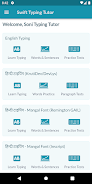
Soni Typing Tutor is an Android utility built to streamline keyboard learning. The app focuses on measurable improvement: speed (WPM), accuracy percentage, and error patterns. Lessons are modular and bite-sized, letting users practice daily without feeling overwhelmed. It supports different keyboard layouts and tailors exercises to weak finger zones.
Core tools and practice modes
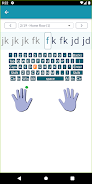
- Guided lessons — Step-by-step tutorials teach home row basics, finger placement, and incremental key groups.
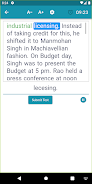
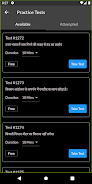
- Timed tests — 1-, 3-, and 5-minute challenges simulate real-world typing pressure and record peak performance.
- Adaptive drills — Exercises focus on frequently mistyped letters and rising error trends rather than repeating mastered keys.
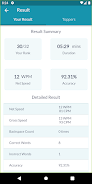
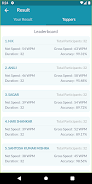
- Progress tracking — Visual charts show WPM growth, accuracy trends, and session history to keep motivation high.
- Custom lessons — Create your own text sets for practicing names, code snippets, or work-related phrases.
How the learning system works
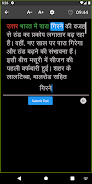
The learning flow is straightforward: assessment, targeted practice, and evaluation. When you start, the app runs a short diagnostic test to establish a baseline. Soni Typing Tutor then recommends a sequence of lessons that balance speed and precision. Each exercise gives immediate feedback—highlighting missed keys, giving corrective hints, and suggesting follow-up drills to close gaps.
User interface and customization
Design choices prioritize clarity. The interface displays a virtual keyboard with color-coded finger guides and dynamic hints that appear as you type. You can switch between compact and full keyboard views, toggle auditory feedback, and adjust text size for better visibility. Theme options include light and dark modes to reduce eye strain during long practice sessions.
Practical features for everyday use
Beyond lessons, Soni Typing Tutor includes tools aimed at real-world typing tasks. Exportable performance reports let users track progress over weeks and months — useful for students, professionals, or anyone preparing for a typing test. The custom lesson editor supports importing text files, making it convenient to practice work-related material or specific coding syntax.
Performance and responsiveness
The app runs smoothly on a wide range of Android devices. Animations are subtle, and latency is minimal when registering keystrokes even on older phones. Memory use stays modest, and periodic autosave prevents data loss if a session gets interrupted. These quality‑of‑life details help you maintain a consistent practice habit without technical distractions.
Experience and motivation
Soni Typing Tutor balances structured training with motivational features. Achievement badges and milestone notifications reward consistent practice and hitting target WPMs. Session summaries emphasize positive trends and give a short checklist of what to focus on next. The combination of analytics and gentle gamification keeps learning purposeful rather than purely competitive.
Tips for beginners
- Start with short sessions—10 to 15 minutes daily beats occasional long workouts.
- Focus on accuracy first; speed will increase naturally once your fingers learn correct paths.
- Use custom lessons to practice frequently used words or technical terms relevant to your job or studies.
- Review the error heatmap weekly to prioritize drills on trouble keys.
Getting started
Install the app, allow basic permissions, and take the initial typing test. Set a realistic weekly goal and enable reminders for short practice sessions. For educators, the app supports exporting progress summaries so class performance can be reviewed collectively. Regular short practice combined with Soni Typing Tutor’s adaptive lessons can produce measurable gains in a few weeks.
Whether you’re learning for school, improving workplace productivity, or prepping for certification, Soni Typing Tutor offers a focused, data-driven approach to mastering the keyboard. Its clean interface, practical feature set, and steady feedback loop make it a useful addition to any learning routine.
Show More
Information
Screenshots
Latest Update











Latest News
-
![Revealing the Launch Playlists and Cross-Progression for COD Warzone Mobile News]()
-
![March 2024 Free Redemption Codes for Honkai: Star Rail News]()
-
PUBG Mobile Teams Up with Bentley Motors: Luxury Cars, Exclusive Collectibles, and Beyond 2024-04-18
![PUBG Mobile Teams Up with Bentley Motors: Luxury Cars, Exclusive Collectibles, and Beyond News]()
-
![Monster Never Cry is now accessible on both Android and iOS mobile devices. News]()
-
V2.2 of the Farlight 84 update introduces an overhauled Season structure, fresh in-game currency, an 2024-04-16
![V2.2 of the Farlight 84 update introduces an overhauled Season structure, fresh in-game currency, an News]()
-
![Arrival of Genshin Impact 4.6 Update: 'Embers of Two Realms, Twilight of Crimson' News]()
-
April 2024 Clash of Clans Update: Unveiling a Fresh Companion, Enhanced Levels, Chat Tagging, and Be 2024-04-16
![April 2024 Clash of Clans Update: Unveiling a Fresh Companion, Enhanced Levels, Chat Tagging, and Be News]()






