

Tapas
Version:7.7.1
Published:2026-11-21
Introduction
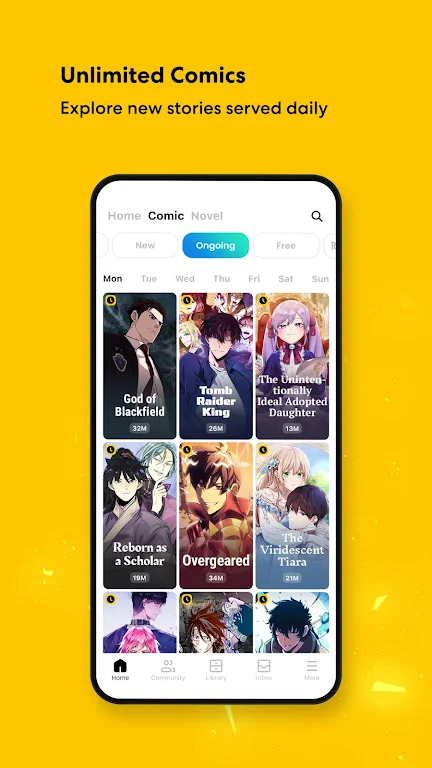
Most reading platforms hide the chapters you want behind confusing paywalls or make discovery a test of patience. Tapas aims to cut through that friction by offering a polished mobile reading experience focused on serialized comics, novels, and webtoons. The app gathers international hits and indie originals in one place, with tools to follow series, save progress, and find stories by mood or genre. Whether you prefer long-form fantasy or bite-sized romance strips, Tapas turns your phone into a compact bookshelf you can carry everywhere.
Categories: Tapas
Serialized Comics: Tapas showcases a wide range of episodic comics, from short gag strips to ongoing artist-driven series that update regularly.
Novels and Short Stories: Read prose fiction in genres like romance, fantasy, sci-fi, and slice-of-life; many works are presented chapter by chapter.
International Titles: The app includes translated manga, manhwa, and other global hits so you can explore styles and storytelling traditions from different regions.
Features: Tapas
Wait-Until-Free: A discoverable mechanic lets you unlock popular episodes for free after a short wait, offering moments of enjoyment without spending credits.
Personal Library: Add series to your list and the app remembers where you left off, so picking up the next chapter is instant when you reopen Tapas.
Community Tools: Comment sections and creator updates help you follow favorite authors and participate in conversations about plot twists or artwork.
Curated Collections: Browse editor picks, trending lists, and themed bundles when you want quick recommendations tailored to moods like 'cozy romance' or 'epic adventure'.
Tips and Tricks:
Use Wait-Until-Free Smartly: Save your credits by planning which series you hasten through purchases versus which you’re willing to unlock for free over time.
Follow Creators: Tapas creators often post bonus sketches or mini-episodes; following them ensures you get notified of extras and live updates.
Download During Wi-Fi: If you expect to read offline, queue a few chapters while you have Wi-Fi so your battery and data last longer when you’re out.
FAQs:
Is Tapas free to use?
Tapas offers a large selection of free content alongside premium episodes that require credits. The Wait-Until-Free option also lets you access some popular chapters at no cost after a wait period.
Can I read offline on Tapas?
Yes, you can download individual chapters to read when you don’t have an internet connection; this is handy for travel or places with poor reception.
How do I support creators on Tapas?
You can purchase episodes or use in-app features like tipping where available. Buying episodes directly helps creators earn revenue and keep series going.
Conclusion:
Tapas brings a lively mix of mainstream hits and indie serials into a single mobile app with thoughtful tools for following, saving, and discovering stories. If you like serialized storytelling and want a community-facing reading app with both free and paid paths, give Tapas a try and browse a few curated lists to find something that clicks with your tastes.
Show More
Information
Screenshots


Latest Update











Hot Tags
Latest News
-
![Revealing the Launch Playlists and Cross-Progression for COD Warzone Mobile News]()
-
![March 2024 Free Redemption Codes for Honkai: Star Rail News]()
-
PUBG Mobile Teams Up with Bentley Motors: Luxury Cars, Exclusive Collectibles, and Beyond 2024-04-18
![PUBG Mobile Teams Up with Bentley Motors: Luxury Cars, Exclusive Collectibles, and Beyond News]()
-
![Monster Never Cry is now accessible on both Android and iOS mobile devices. News]()
-
V2.2 of the Farlight 84 update introduces an overhauled Season structure, fresh in-game currency, an 2024-04-16
![V2.2 of the Farlight 84 update introduces an overhauled Season structure, fresh in-game currency, an News]()
-
![Arrival of Genshin Impact 4.6 Update: 'Embers of Two Realms, Twilight of Crimson' News]()
-
April 2024 Clash of Clans Update: Unveiling a Fresh Companion, Enhanced Levels, Chat Tagging, and Be 2024-04-16
![April 2024 Clash of Clans Update: Unveiling a Fresh Companion, Enhanced Levels, Chat Tagging, and Be News]()






