

Minimal Widgets
Version:1.0.07
Published:2026-11-21
Introduction
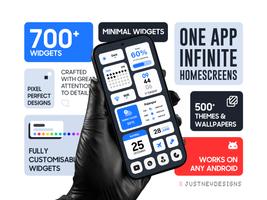
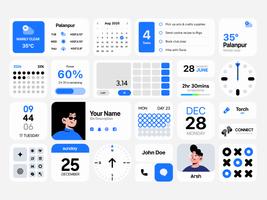
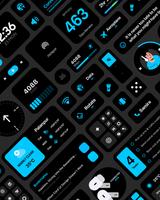
Minimal Widgets brings a simple, practical approach to home-screen design by offering a compact pack of native Android widgets that prioritize clarity and personal expression. Minimal Widgets places essential tools — clocks, calendars, weather, battery meters, quick toggles, photo frames, productivity helpers and a pedometer — into a single installable collection so you can quickly shape a calm, distraction-minimized interface.
Key features
The widget pack focuses on resizable, responsive layouts that adapt to different grid sizes and launcher environments. Each widget can be resized and repositioned like standard Android widgets; touch interactions are straightforward: tap to open an associated app or configuration, long-press to move or resize, and use your launcher’s widget picker to place items. Color customization is built in, letting you adjust foreground, background, accents and transparency without third-party editors. Included minimalist wallpapers are curated to work with these widgets, making it easy to build cohesive themes that read well at a glance.
Customization and controls
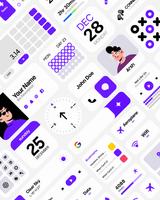
Customization in Minimal Widgets centers on precise color control and simple layout choices rather than extensive menus. Users can select monochrome, pastel, or vibrant palettes and tweak individual elements — for example, the clock hands, numbers, calendar highlights, battery bar and step counter accents. Controls are intentionally familiar: resize handles, drag-and-drop placement, and in-widget quick actions (tap to refresh, open settings or shortcut selected apps). The interface stays lightweight so adjustments happen quickly and without extra apps.
Visual style and typography
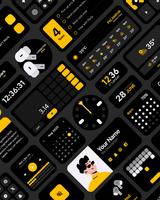
The designs emphasize legibility and restraint, using clean typography, generous spacing and subtle contrast to reduce visual noise. Widgets are crafted to look consistent on dark or light wallpapers, while maintaining readable information hierarchy: larger elements for time and date, smaller secondary text for battery and step counts. This approach keeps home screens looking organized whether you prefer a near-empty aesthetic or a few essential tools clustered in a corner.
Progression and updates
Rather than a traditional progression system, Minimal Widgets evolves through regular updates that expand the widget library and refine existing pieces. New widget types, additional size presets and small behavior improvements arrive in periodic releases based on user feedback. This steady update model gives a sense of progression: your toolkit grows over time and you can change your home-screen setup gradually as new options become available.
Offline use and performance
Most widgets operate locally and are optimized for low resource use so they remain responsive without draining battery. The pack is designed to run offline for core functions like clocks, calendaring and battery displays; services such as weather may request network access to fetch current conditions, and the pedometer uses the device’s built-in sensors rather than streaming data. Because the widgets are native, they do not rely on continuous background services beyond what the system provides.
Accessibility and user experience
Minimal Widgets aims for inclusivity by supporting adjustable contrast and scalable type sizes in many widgets, improving readability for users who need larger text or stronger contrast. The straightforward controls and predictable behavior reduce cognitive load: add, configure, and place widgets in just a few steps. The developer pays attention to feedback, and common accessibility improvements are incorporated in updates when requested.
Support, privacy and limitations
The developer, JustNewDesigns, provides support and a refund policy for users who encounter issues; contact details are included with the app listing. Because widgets are native, permissions are generally minimal and limited to features that require hardware or network access (for example, step counting or live weather). Keep in mind that the pack favors minimal aesthetics: if you want very information-dense, feature-rich widgets with multiple data feeds in a single pane, Minimal Widgets may feel intentionally sparse. The collection is expanding, so certain niche widget types may not be available yet.
Who should install it
Minimal Widgets is well suited for users who prefer a calm, orderly home screen, want tight control over color and typography, and appreciate a small, focused set of native widgets that integrate cleanly with Android launchers. Minimal Widgets makes it straightforward to craft a home screen that reflects your style while keeping functionality within clear, usable bounds.
Show More
Information
Screenshots
Latest Update











Latest News
-
![Revealing the Launch Playlists and Cross-Progression for COD Warzone Mobile News]()
-
![March 2024 Free Redemption Codes for Honkai: Star Rail News]()
-
PUBG Mobile Teams Up with Bentley Motors: Luxury Cars, Exclusive Collectibles, and Beyond 2024-04-18
![PUBG Mobile Teams Up with Bentley Motors: Luxury Cars, Exclusive Collectibles, and Beyond News]()
-
![Monster Never Cry is now accessible on both Android and iOS mobile devices. News]()
-
V2.2 of the Farlight 84 update introduces an overhauled Season structure, fresh in-game currency, an 2024-04-16
![V2.2 of the Farlight 84 update introduces an overhauled Season structure, fresh in-game currency, an News]()
-
![Arrival of Genshin Impact 4.6 Update: 'Embers of Two Realms, Twilight of Crimson' News]()
-
April 2024 Clash of Clans Update: Unveiling a Fresh Companion, Enhanced Levels, Chat Tagging, and Be 2024-04-16
![April 2024 Clash of Clans Update: Unveiling a Fresh Companion, Enhanced Levels, Chat Tagging, and Be News]()






