

Al Quran Indonesia
Version:2.7.92
Published:2026-11-21
Introduction
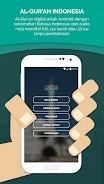
Al Quran Indonesia is a mobile application that brings the Quran in Bahasa Indonesia with clear translations, audio recitations, and study tools. It offers searchable text, verse-by-verse audio, and bookmarking features to support daily reading, learning tajweed basics, and managing personal study routines.
What the App Offers
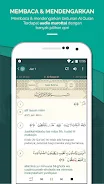
Designed for Indonesian speakers and learners, Al Quran Indonesia focuses on accessibility and clarity. The app integrates full Arabic script, Indonesian translation, and transliteration so users at different levels can follow along. Built-in audio recitations let you listen to selected surahs or entire juz, while variable playback controls and repeat modes support memorization and review.
Interface and Navigation
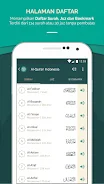
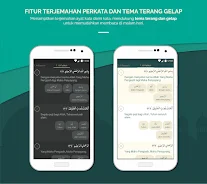
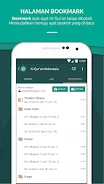
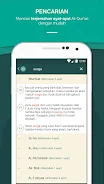
The layout favors straightforward navigation: a clear table of contents, quick-access bookmarks, and a search bar that locates words, phrases, and surah names fast. Pages display Arabic text alongside Indonesian translation with adjustable font sizes and background themes to reduce eye strain during night reading. Intuitive gestures and a minimalist toolbar speed up movement between surahs and bookmarked verses.
Study Tools and Learning Features
Al Quran Indonesia includes multiple study aids tailored for daily practice. Users can highlight verses, add personal notes, and tag passages for later review. The verse-by-verse playback feature pairs audio with highlighted text to help learners connect pronunciation with meaning. A built-in tajweed reference explains common rules and points to consult while reciting.
Audio and Recitation Options
Audio functionality is a cornerstone of the app. Choose from a selection of reciters with varied tones and pacing, and use adjustable speed to slow down difficult passages. Offline download options let you save recitations for use without an internet connection. Continuous play mode and sleep timers are available for listening during travel or before sleep.
Personalization and Study Plans
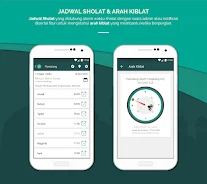
Personalization features help maintain momentum and build consistent habits. Create daily reading targets, track completed verses, and set reminders for prayer times or study sessions. The app’s progress tracker visualizes completed juz and bookmarked passages, which is useful for users preparing for recitation goals or tracking memorization milestones.
Accessibility and Compatibility
Al Quran Indonesia aims to work smoothly on a wide range of Android devices. The interface adapts to different screen sizes, and lightweight performance options help conserve battery and data. Low-bandwidth modes and compressed audio files minimize download sizes without compromising clarity. Regular updates address compatibility with newer Android versions and improve stability.
Security, Privacy, and Offline Use
Privacy-conscious users will appreciate offline reading and local storage options for bookmarks and notes. The app stores personal annotations on the device unless cloud sync is enabled. Data usage can be restricted to Wi-Fi, and permissions are kept minimal to protect user privacy while preserving core functionality.
How to Start Using the App
Getting started is simple: install the app, choose preferred display and audio settings, and begin with a bookmarked surah or the featured daily reading. New users can explore sample recitations and try the transliteration view to build confidence with Arabic pronunciation. Custom study plans can be created in a few taps to match your schedule and goals.
Why Users Choose This App
Users looking for an Indonesian-language Quran resource value the balanced mix of translation clarity, audio quality, and practical study tools. Al Quran Indonesia combines essential features without overwhelming new learners, making it a practical companion for both short daily sessions and extended study periods.
Tips for Effective Use
- Set a small daily reading goal to build consistency.
- Use verse-by-verse audio with repeat mode to work on pronunciation.
- Download favorite recitations for offline review during travel.
- Leverage bookmarks and personal notes to create a customized study plan.
Show More
Information
Screenshots

Latest Update











Latest News
-
![Revealing the Launch Playlists and Cross-Progression for COD Warzone Mobile News]()
-
![March 2024 Free Redemption Codes for Honkai: Star Rail News]()
-
PUBG Mobile Teams Up with Bentley Motors: Luxury Cars, Exclusive Collectibles, and Beyond 2024-04-18
![PUBG Mobile Teams Up with Bentley Motors: Luxury Cars, Exclusive Collectibles, and Beyond News]()
-
![Monster Never Cry is now accessible on both Android and iOS mobile devices. News]()
-
V2.2 of the Farlight 84 update introduces an overhauled Season structure, fresh in-game currency, an 2024-04-16
![V2.2 of the Farlight 84 update introduces an overhauled Season structure, fresh in-game currency, an News]()
-
![Arrival of Genshin Impact 4.6 Update: 'Embers of Two Realms, Twilight of Crimson' News]()
-
April 2024 Clash of Clans Update: Unveiling a Fresh Companion, Enhanced Levels, Chat Tagging, and Be 2024-04-16
![April 2024 Clash of Clans Update: Unveiling a Fresh Companion, Enhanced Levels, Chat Tagging, and Be News]()






