

Capacity Info: Battery Health
Version:7.7.1.1
Published:2026-11-09
Introduction
Capacity Info: Battery Health is a lightweight diagnostic tool that helps you inspect the real condition and remaining capacity of a phone or tablet battery within seconds. Capacity Info: Battery Health surfaces residual capacity, current capacity, temperature, voltage and charge cycle counts in a clear readout so you can judge wear, validate a replacement cell or simply monitor daily performance. The app runs without ads, uses very little background power and offers optional overlays and premium readouts for users who need deeper numeric detail.
Key features and practical uses
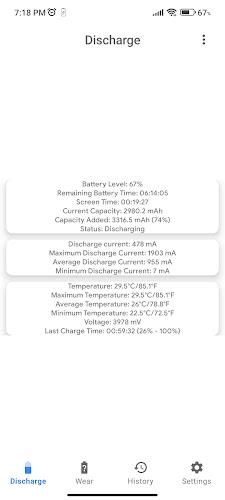
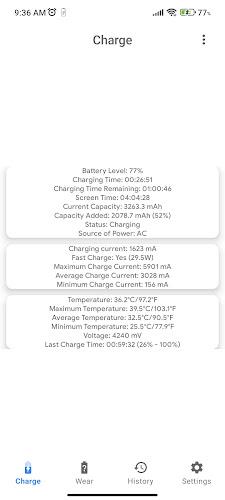
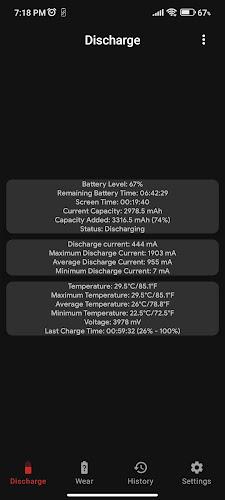
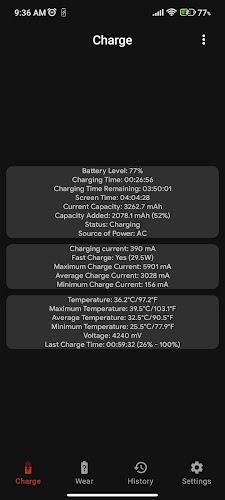
Capacity Info: Battery Health reports capacity in milliamp-hours and, on supported devices, in watt-hours, with current, minimum, maximum and average values when available. The app tracks charge and discharge current and displays temperature and voltage trends so you can diagnose heating or charging problems. Notifications can be set for low battery thresholds, reached charge levels, full charge and temperature extremes, and alerts are adjustable to match how you charge and maintain your device. A compact overlay keeps essential info visible while you use other apps, and premium options unlock additional units and a wattage display.
How it works and what you can expect
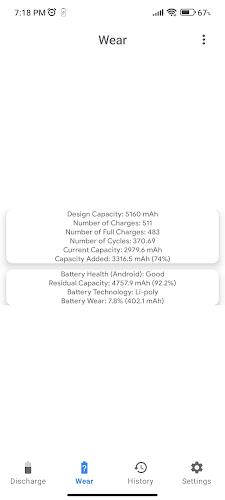
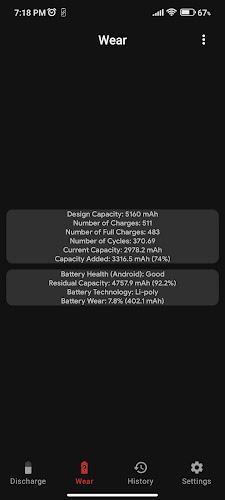
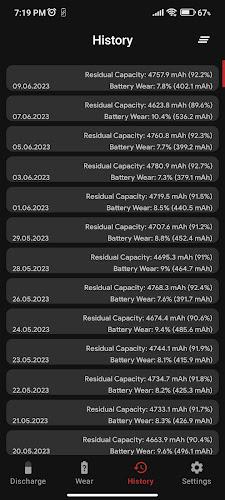
The app reads information exposed by the device’s battery management system and computes meaningful metrics such as residual capacity and estimated wear. Where the operating system provides cycle count and historical charge data, Capacity Info: Battery Health summarizes those records and highlights trends over time so you can see gradual capacity loss. On some devices advanced readings may be unavailable because of hardware or firmware limits; the app explicitly indicates which values are measured and which are estimated.
Controls, workflow and progression tracking
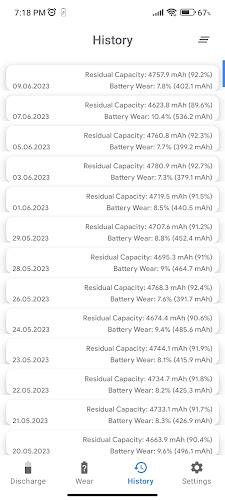
Interaction is simple: tap a value to view a short explanation, open the settings to change units or alert thresholds, and use long-press gestures on chart elements to lock a selection for closer inspection. Progression is represented by logged capacity and cycle data so you can follow battery health across weeks or months; this historical perspective helps you decide when a replacement is necessary or whether a charging habit is accelerating wear. Regular use creates a reliable timeline that makes gradual degradation easier to understand than a single snapshot.
Visual style, level indicators and accessibility
The interface presents data in a compact, readable layout with clear numeric readouts and simple trend lines rather than flashy animations. Health levels are shown with plain language labels (Healthy, Moderate Wear, Replace Soon) tied to measured capacity percentages so non-technical users can interpret results quickly. Accessibility options include adjustable font sizes, high-contrast color themes and straightforward labels for screen readers, making the app usable by a wide range of users. Visual settings are selectable in the options screen and persist across sessions.
Customization, offline use and minimal impact
Capacity Info: Battery Health is designed to work offline without requiring an Internet connection for core diagnostics; all measurements come from local system data. You can customize units (mAh, Wh), choose which alerts are active, and enable or disable the overlay or background sampling to control battery impact. The app intentionally minimizes background activity and avoids persistent wake locks so monitoring itself does not become a significant drain on autonomy.
Replay value, challenges and practical scenarios
The app remains useful over time because battery health is a changing condition: repeated checks, timed alerts and recorded trends give continuous value as a tool for maintenance and troubleshooting. For users who enjoy systematic testing, the app supports informal stress workflows such as observing capacity changes during repeated charge cycles, tracking temperature responses to heavy use, and comparing readings before and after a replacement battery is fitted. These workflows provide a practical challenge of optimizing charging habits and extending device lifetime.
Development, support and privacy
Capacity Info: Battery Health is developed and maintained by an independent developer as open-source software and distributed without ads. The developer welcomes bug reports, suggestions and translations by email; details are provided inside the app. Privacy is straightforward: the app reads only battery-related metrics from the system and does not collect personal content, and optional premium features are local to the device unless the user explicitly authorizes sharing. If a measurement is not available on a device, the app explains the limitation so you can understand what can and cannot be measured on your hardware.
Show More
Information
Screenshots
Latest Update










Latest News
-
![Revealing the Launch Playlists and Cross-Progression for COD Warzone Mobile News]()
-
![March 2024 Free Redemption Codes for Honkai: Star Rail News]()
-
PUBG Mobile Teams Up with Bentley Motors: Luxury Cars, Exclusive Collectibles, and Beyond 2024-04-18
![PUBG Mobile Teams Up with Bentley Motors: Luxury Cars, Exclusive Collectibles, and Beyond News]()
-
![Monster Never Cry is now accessible on both Android and iOS mobile devices. News]()
-
V2.2 of the Farlight 84 update introduces an overhauled Season structure, fresh in-game currency, an 2024-04-16
![V2.2 of the Farlight 84 update introduces an overhauled Season structure, fresh in-game currency, an News]()
-
![Arrival of Genshin Impact 4.6 Update: 'Embers of Two Realms, Twilight of Crimson' News]()
-
April 2024 Clash of Clans Update: Unveiling a Fresh Companion, Enhanced Levels, Chat Tagging, and Be 2024-04-16
![April 2024 Clash of Clans Update: Unveiling a Fresh Companion, Enhanced Levels, Chat Tagging, and Be News]()






