

Lite Writer: Writing/Note/Memo
Version:1.81.3
Published:2026-11-10
Introduction
Lite Writer: Writing/Note/Memo is a focused, lightweight writing and note-taking app built for authors, novelists, journalists and anyone who wants a calm, book-like workspace for drafting chapters, logging ideas and keeping memos. Lite Writer: Writing/Note/Memo intentionally blends a simple, distraction-reducing interface with a file-based bookshelf so you can treat each project like a physical notebook while still benefiting from digital tools such as autosave, cloud or local backup and quick capture. The app is designed to make it easy to move between short notes and long-form drafts without hunting through menus, keeping essential writing metrics and organization visible but unobtrusive.
Key features and project structure
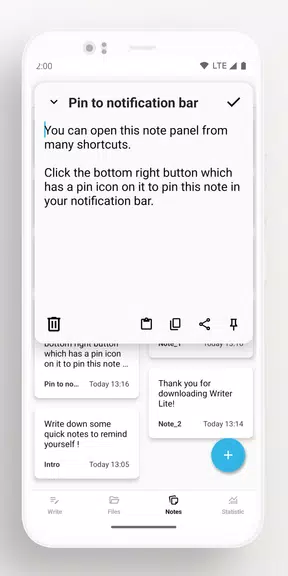
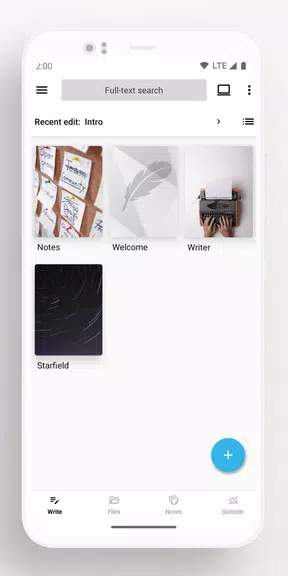
The core of the app is a folder-and-file bookshelf that presents projects as organized stacks of files and chapters, allowing personalized covers, easy renaming and streamlined bulk operations for archiving or exporting. Intelligent chapter number recognition and automatic sorting are built into the file view so serial works and multi-chapter manuscripts remain in the correct order even when filenames are edited. A dedicated quick-note panel provides one-tap capture for fleeting ideas and a persistent area to pin priority notes to the notification shade, while a full editor supports plain file editing so you can open and edit documents with desktop tools via mapped home-folder syncing.
Controls and user interaction
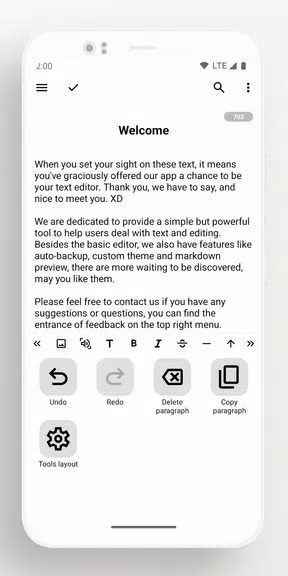
Input and navigation prioritize speed and comfort: the editor supports standard on-screen keyboards, external Bluetooth keyboards, and common keyboard shortcuts for saving, undo/redo and navigation between chapters. Touch gestures and contextual menus let you move sections, duplicate files or open a quick preview without leaving the editor. A distraction-free compose mode hides non-essential chrome for focused drafting, and long-press actions on list items enable fast batch work when organizing many chapters or notes.
Progress tracking, goals and challenge systems
Writing progress is tracked in several ways to help you build momentum. Live word and character counters update as you type, a floating widget can show counts while using other apps, and seven-day trend tracking visualizes recent activity so you can spot productive runs or lulls. Built-in goal options let you set daily word targets or chapter-length milestones and monitor streaks over time; these systems are intentionally lightweight so they encourage routine rather than gamify the craft. Offline tracking keeps goals and counters available whether you are connected or not.
Customization, visual style and readability
Visual options focus on readability and personalization: adjustable text sizes, line spacing, and a choice of light or dark themes help match the app to your working environment. Project covers and simple metadata fields make it easier to scan many works at a glance, and templates for common structures such as chapter outlines or research notes can be applied to new files to reduce repetitive setup. The editor respects character sets including CJK support so multilingual writers can work without character-count issues or layout glitches.
Syncing, backups and offline capabilities
Syncing is file-based and can map your phone or tablet home folder to a desktop, allowing you to edit the same files with full-featured editors on PC while keeping the mobile app as a distraction-free companion. Backup options include cloud and local choices; some remote and server backups require initial configuration but once connected they provide automated snapshots and exportable copies. The app is designed to function offline first, letting you write and save without a connection and then sync changes when a network becomes available.
Security, privacy and accessibility
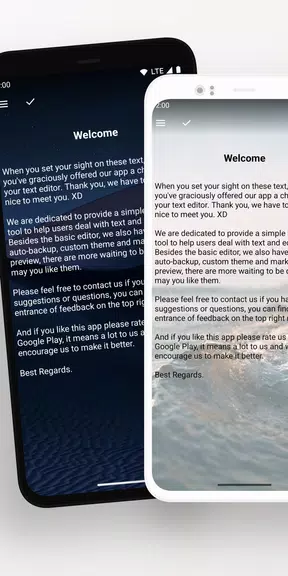
Security features include optional fingerprint or pattern locks for the app, automatic idle locking to protect drafts when a device is inactive, and blurred recent-app thumbnails to reduce sensitive content exposure on the multitask screen. Accessibility considerations include large-font modes, clear contrast themes and support for screen reader navigation so writers with different needs can adapt the interface. Local storage options give users full control over where drafts live, and the app emphasizes straightforward permissions and transparent backup choices.
Limitations and ideal use cases
Lite Writer: Writing/Note/Memo is optimized for single-user productivity rather than collaborative, real-time editing; teams requiring live coauthoring should consider dedicated collaboration suites. The app also prioritizes writing and organization over advanced desktop-level layout or publishing features, so highly formatted typesetting or print-ready page layout should be completed with desktop tools after export. Some advanced backup and server sync options require a one-time setup step to connect to your preferred storage, but the app provides clear guidance for those configurations.
Whether you need a minimal space to capture sudden ideas, a reliable tool to draft long chapters, or a portable companion to your desktop writing workflow, Lite Writer: Writing/Note/Memo offers a pragmatic balance of organization, progress tracking and privacy controls so you can focus on words rather than app complexity.
Show More
Information
Screenshots
Latest Update










Latest News
-
![Revealing the Launch Playlists and Cross-Progression for COD Warzone Mobile News]()
-
![March 2024 Free Redemption Codes for Honkai: Star Rail News]()
-
PUBG Mobile Teams Up with Bentley Motors: Luxury Cars, Exclusive Collectibles, and Beyond 2024-04-18
![PUBG Mobile Teams Up with Bentley Motors: Luxury Cars, Exclusive Collectibles, and Beyond News]()
-
![Monster Never Cry is now accessible on both Android and iOS mobile devices. News]()
-
V2.2 of the Farlight 84 update introduces an overhauled Season structure, fresh in-game currency, an 2024-04-16
![V2.2 of the Farlight 84 update introduces an overhauled Season structure, fresh in-game currency, an News]()
-
![Arrival of Genshin Impact 4.6 Update: 'Embers of Two Realms, Twilight of Crimson' News]()
-
April 2024 Clash of Clans Update: Unveiling a Fresh Companion, Enhanced Levels, Chat Tagging, and Be 2024-04-16
![April 2024 Clash of Clans Update: Unveiling a Fresh Companion, Enhanced Levels, Chat Tagging, and Be News]()






