

IP Scanner
Version:1.3.6
Published:2026-11-10
Introduction
IP Scanner is a mobile utility designed to discover devices and services on local networks quickly and reliably. The app provides a clear inventory of connected hosts, open ports, and basic device information, helping both casual users and IT professionals diagnose connectivity issues and manage devices from an Android phone or tablet.
Core capabilities
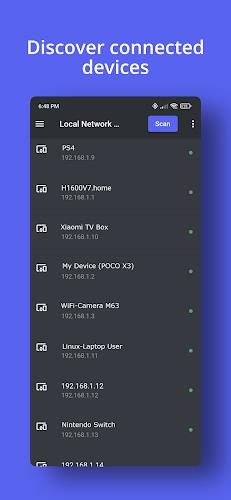
At its heart, IP Scanner performs network discovery and basic diagnostics with a minimal learning curve. It scans assigned IP ranges, identifies responsive devices via ping and ARP, and offers port checks to reveal commonly used services such as HTTP, SSH, SMB, and custom ports. Results are presented in a compact list with IP, hostname, MAC address, and vendor hints where available.
Key features you will use every day
- Fast network discovery — sweep entire subnets or target specific IP ranges with configurable timeouts.
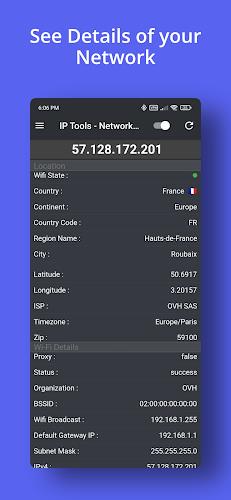
- Device details — see hostnames, MAC addresses, vendor lookups, and response times to prioritize troubleshooting.
- Port scanning — check selected TCP ports to determine which services are reachable.
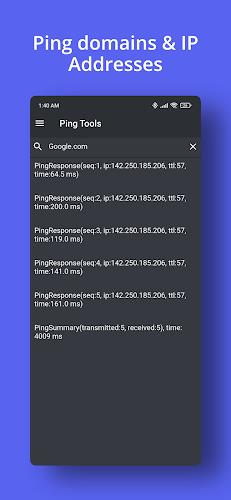
- Ping and traceroute — verify reachability and view hop-by-hop paths to remote hosts.
- Exportable results — export scans to CSV for reporting or inventory management.
How scanning works
When you launch a scan, IP Scanner sends lightweight network probes and listens for replies. The app uses ICMP echo requests (ping) where supported, ARP on local networks for reliable detection, and TCP probes for port checks. Scans are staggered to reduce network load and to avoid long wait times; you can adjust concurrency and timeouts to match your environment.
Practical workflows
Common use cases include identifying rogue devices, mapping a home or office network, and validating that servers or IoT devices are online after maintenance. For administrators maintaining small to medium networks, IP Scanner simplifies routine checks: schedule a scan, review devices with unexpected open ports, then export findings for follow-up. Home users can quickly find the IP addresses of smart appliances and verify firmware update servers are reachable.
Interface and user experience
The interface emphasizes clarity: scan results appear in a sortable list with color-coded states for easy scanning. Tapping a device expands details and reveals quick actions such as ping, traceroute, copy IP, or open in a browser. Settings allow you to customize the scan depth, enable or disable vendor lookups, and save frequently used ranges for fast access.
Advanced tools and customization
For power users, IP Scanner includes advanced options like custom port lists, rate limiting, and scheduled scans. You can chain actions—perform a port check immediately after discovery, or run a traceroute for any host that fails a ping. Saved profiles let you switch between home, office, and remote site configurations without re-entering parameters.
Performance, battery and permissions
IP Scanner is optimized to balance thoroughness with resource efficiency. Scans can be throttled to reduce CPU and battery impact. The app requests only network-related permissions needed for discovery; no intrusive permissions are required. Background scanning is available with device-friendly scheduling so routine checks don’t drain battery life.
Compatibility and requirements
The app supports a wide range of Android versions and works on phones and tablets with standard Wi-Fi and cellular configurations. It functions best when connected to the same local network as the target devices. For networks using enterprise firewalls or strict isolation, some probes may be blocked, in which case the app falls back to alternate detection methods where permitted.
Getting started
Begin by granting network permissions and choosing a scan range—your current subnet is suggested automatically. Run a quick scan to populate the device list, then explore device details and run port checks for any host of interest. Use saved scans for recurring checks and export results to share with team members or for documentation.
Why use IP Scanner
IP Scanner combines a straightforward interface with robust discovery and diagnostic tools, making it a useful companion for network troubleshooting, inventory, and routine checks. The balance of simplicity and configurable options helps both casual users and IT staff get clear answers about what's active on the network without needing a laptop or complex tooling.
Show More
Information
Screenshots
Latest Update











Latest News
-
![Revealing the Launch Playlists and Cross-Progression for COD Warzone Mobile News]()
-
![March 2024 Free Redemption Codes for Honkai: Star Rail News]()
-
PUBG Mobile Teams Up with Bentley Motors: Luxury Cars, Exclusive Collectibles, and Beyond 2024-04-18
![PUBG Mobile Teams Up with Bentley Motors: Luxury Cars, Exclusive Collectibles, and Beyond News]()
-
![Monster Never Cry is now accessible on both Android and iOS mobile devices. News]()
-
V2.2 of the Farlight 84 update introduces an overhauled Season structure, fresh in-game currency, an 2024-04-16
![V2.2 of the Farlight 84 update introduces an overhauled Season structure, fresh in-game currency, an News]()
-
![Arrival of Genshin Impact 4.6 Update: 'Embers of Two Realms, Twilight of Crimson' News]()
-
April 2024 Clash of Clans Update: Unveiling a Fresh Companion, Enhanced Levels, Chat Tagging, and Be 2024-04-16
![April 2024 Clash of Clans Update: Unveiling a Fresh Companion, Enhanced Levels, Chat Tagging, and Be News]()






